MySQL → PostgreSQL
The differences that actually matter when you have spent a decade in MySQL and are learning your way around Postgres.
At a glance
Both are mature, free, ACID-compliant relational databases. The rest of this guide is the nuance.

Postgres treats the type system as a feature
MySQL gives you a solid, pragmatic set of scalar types plus JSON. Postgres covers the common scalar needs and then keeps going: native arrays, ranges, network and geometric types, UUIDs, domains, composite types, and the ability to define your own. For someone migrating, JSON and arrays open useful options—but neither replaces a relational model when the values have their own identity or relationships.
JSON, indexed both ways
Both store JSON. The difference is ergonomics: Postgres jsonb ships with containment operators and GIN indexing; in MySQL you index expressions, generated columns, or typed values from JSON arrays.
Arrays: native vs emulated
This is a genuine capability gap. Postgres has first-class array columns you can query with ANY. MySQL has no SQL array type: use a JSON array, including a multi-valued index when it fits, or normalize the values into a junction table. Arrays work best for small, bounded lists that belong to the row; use a related table when the elements need constraints, metadata, or independent updates.
Ordinary row reads don't block row writes — on both
Here is reassuring news: both databases use MVCC (multi-version concurrency control), so ordinary row reads see a consistent snapshot rather than half-finished data. Locking reads, constraints, and schema changes can still wait. Postgres keeps old row versions in the table and cleans them up with VACUUM; MySQL/InnoDB keeps them in an undo log and purges them in the background.
The gotcha that will bite you: transactional DDL
This is the single biggest day-to-day surprise. In Postgres, most schema changes can be wrapped in a transaction and rolled back. MySQL DDL generally causes an implicit commit. PostgreSQL still has exceptions: for example, CREATE INDEX CONCURRENTLY cannot run inside a transaction block.
One more default worth knowing: MySQL/InnoDB isolates transactions at REPEATABLE READ out of the box, while Postgres defaults to READ COMMITTED. Your queries can behave subtly differently under concurrency until you align them.
Same B-tree, very different toolbox
Everyday B-tree indexes work similarly. Postgres adds a wider set of index types (GIN, GiST, BRIN, Hash, SP-GiST) plus partial and expression indexes. CREATE INDEX CONCURRENTLY avoids blocking writes. MySQL 8.4 has functional, invisible, and JSON multi-valued indexes, but no partial indexes.
With a primary key, rows live inside that clustered index; secondary indexes store the PK and may require a second hop. Without one, InnoDB chooses a suitable unique index or creates a hidden clustered index.
Rows live in an unordered heap; every index (including the PK) points into it. This enables several index methods, but every added index still costs storage and write maintenance.
Small syntax differences, real workflow impact
The one you will reach for constantly: RETURNING. Postgres can return chosen columns and expressions directly from the statement. MySQL clients receive the generated ID in the insert response, but returning arbitrary inserted values usually needs another statement.
Upsert: two spellings of the same idea
Where PostgreSQL diverges most
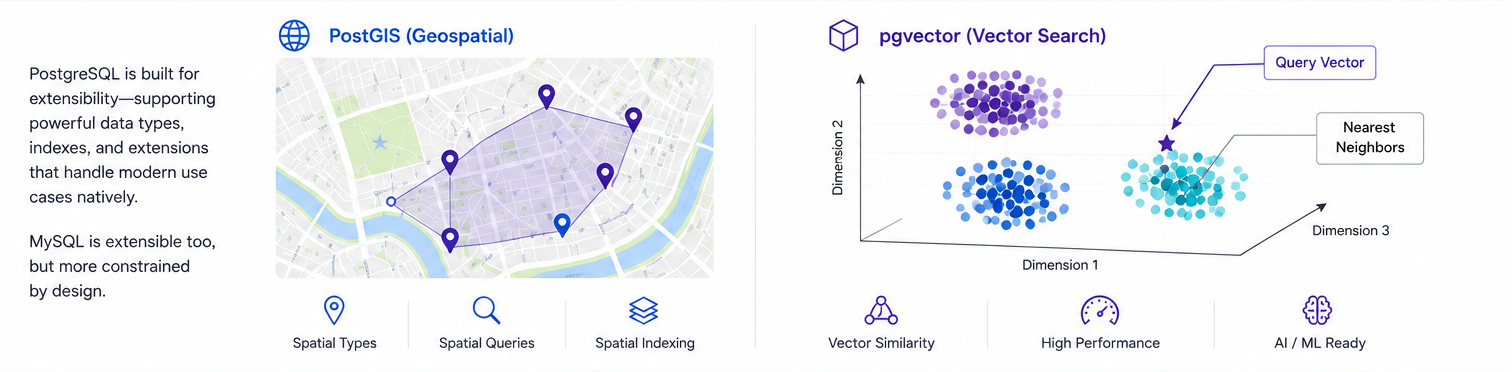
Postgres was designed to be extended. Once an extension's supporting files are installed—or your managed provider offers it—CREATE EXTENSION adds capabilities such as geospatial queries (PostGIS), vector search (pgvector), time-series tooling (TimescaleDB), and query statistics. MySQL extends the server mainly through pluggable storage engines and plugins: a different, more infrastructure-oriented model.
Neither is "faster" — they optimize for different shapes
On modern versions the gap for ordinary workloads is small. The differences show up at the edges: connection handling, complex query planning, and the maintenance each MVCC design demands.
- ·InnoDB's clustered primary key rewards compact keys and access patterns built around them.
- ·Secondary lookups may make a second hop through the primary key.
- ·Thread-per-connection by default; reuse connections to avoid churn at scale.
- ·Replication and high availability are mature, but topology and failover choices remain workload-specific.
- ·Several index methods, richer SQL semantics, and parallel plans give the optimizer more options.
- ·Heap access and table statistics make plan quality sensitive to vacuum and analyze health.
- ·Process-per-connection: pool with PgBouncer for many clients.
- ·Watch for table bloat; tune autovacuum on write-heavy tables.
The practical shift is to benchmark your own query mix and learn each engine's maintenance signals. PostgreSQL gives you more ways to express and index demanding queries; whether they run faster depends on the schema, data distribution, statistics, configuration, and hardware.
The syntax is the easy part
Most migration surprises come from defaults and data semantics, not from rewriting AUTO_INCREMENT. Audit these before moving production data.
PostgreSQL has no unsigned integer types. Widen the column or add a range constraint, then verify foreign keys use matching types.
Do not assume equality, sorting, or unique constraints behave identically. Test the actual collations, Unicode data, and case-insensitive lookups you rely on.
Map each temporal column deliberately. In PostgreSQL, timestamptz represents an instant; it does not retain the original zone label.
Inventory zero dates, truncated strings, coercions, and permissive-mode artifacts before export. PostgreSQL may reject rows that MySQL previously accepted or normalized.
Unquoted PostgreSQL identifiers fold to lowercase. Mixed-case or reserved names require double quotes everywhere, so normalize names when you can.
Reset sequence values after bulk loads, size the connection pool for PostgreSQL, and monitor autovacuum rather than treating it as optional cleanup.
Choose for the constraints you actually have
Both can serve a wide range of applications well. The wrong choice is the one that ignores required features, team expertise, provider support, migration risk, or the workload you measured.
- ·Your existing schema, tooling, and operating model already fit it well.
- ·Your team and tooling already know it well.
- ·Your provider and application stack offer a well-understood MySQL path.
- ·Your data model wants JSON, arrays, ranges, or custom types.
- ·You write complex analytical queries alongside transactions.
- ·You need extensions such as PostGIS or pgvector, or richer constraint and index semantics.
A decade of MySQL experience transfers well, but the migration is more than syntax. Most DDL can now roll back, AUTO_INCREMENT becomes GENERATED … AS IDENTITY, and VACUUM becomes part of normal operations. The richer type, index, and extension systems are useful when they solve a concrete problem—and each brings choices worth testing.